
You’re stuck in a hotel room with one Ethernet port and five devices fighting for Wi-Fi. The captive portal demands $20 per device, the signal vanishes every time you move near the bathroom, and you’d rather not broadcast your banking session to every guest. A travel router—the palm-sized device charging beside your phone—solves this in under two minutes. This isn’t just another gadget; it’s your personal internet butler that transforms sketchy connections into secure, private networks anywhere. Below, you’ll discover exactly how does a travel router work, what happens inside its compact shell, and why digital nomads consider it non-negotiable luggage.
Most travelers assume public Wi-Fi is “free” until they hit paywalls, device limits, or security nightmares. A travel router bypasses these by becoming the only device the hotel or café sees. It handles logins, encryption, and network management so your laptop, phone, and tablet operate on a private slice of the internet. Forget juggling multiple subscriptions or risking data theft—this $40-$250 device creates a fortress from flimsy connections. By the end of this guide, you’ll know how to deploy it on planes, in hostels, or at remote campsites while avoiding common pitfalls.
What Exactly Does a Travel Router Do for You?
A travel router acts as your personal network translator. It grabs unstable internet sources—like a hotel’s single Ethernet cable, an airport’s spotty Wi-Fi, or your phone’s cellular hotspot—and rebuilds them into a private, encrypted network under your control. The magic happens in three layers: connection acquisition, security wrapping, and device management. Instead of each gadget fighting for access, your router becomes the single point of contact with the outside world. Hotels see only one MAC address (yours), captive portals get authenticated once, and all downstream devices connect to your secure SSID without further logins.
Why Hotels and Cafés Can’t Limit Your Devices
When you plug a travel router into a hotel Ethernet port, it negotiates the connection using DHCP or PPPoE protocols—handling the payment or login process through its web interface. Once authenticated, it broadcasts your custom network (e.g., “NomadNet”) with WPA3 encryption. The hotel’s system registers only the router’s MAC address, ignoring your phone, laptop, and tablet. No more per-device fees or artificial limits. Public Wi-Fi works similarly: you solve the captive portal once on the router’s admin page, and it clones your credentials for seamless future logins.
How It Handles Cellular Failover Automatically
Modern travel routers detect connection drops in under 5 seconds. If your café Wi-Fi dies, it instantly switches to your phone’s 4G/5G hotspot via USB tethering or Wi-Fi pairing. High-end models even manage dual-SIM dongles, prioritizing Verizon 5G over AT&T when signal strength dips. This handoff happens silently—your Zoom call continues without freezing because the router maintains a single network identity for all devices.
Inside Your Travel Router: Hardware Breakdown
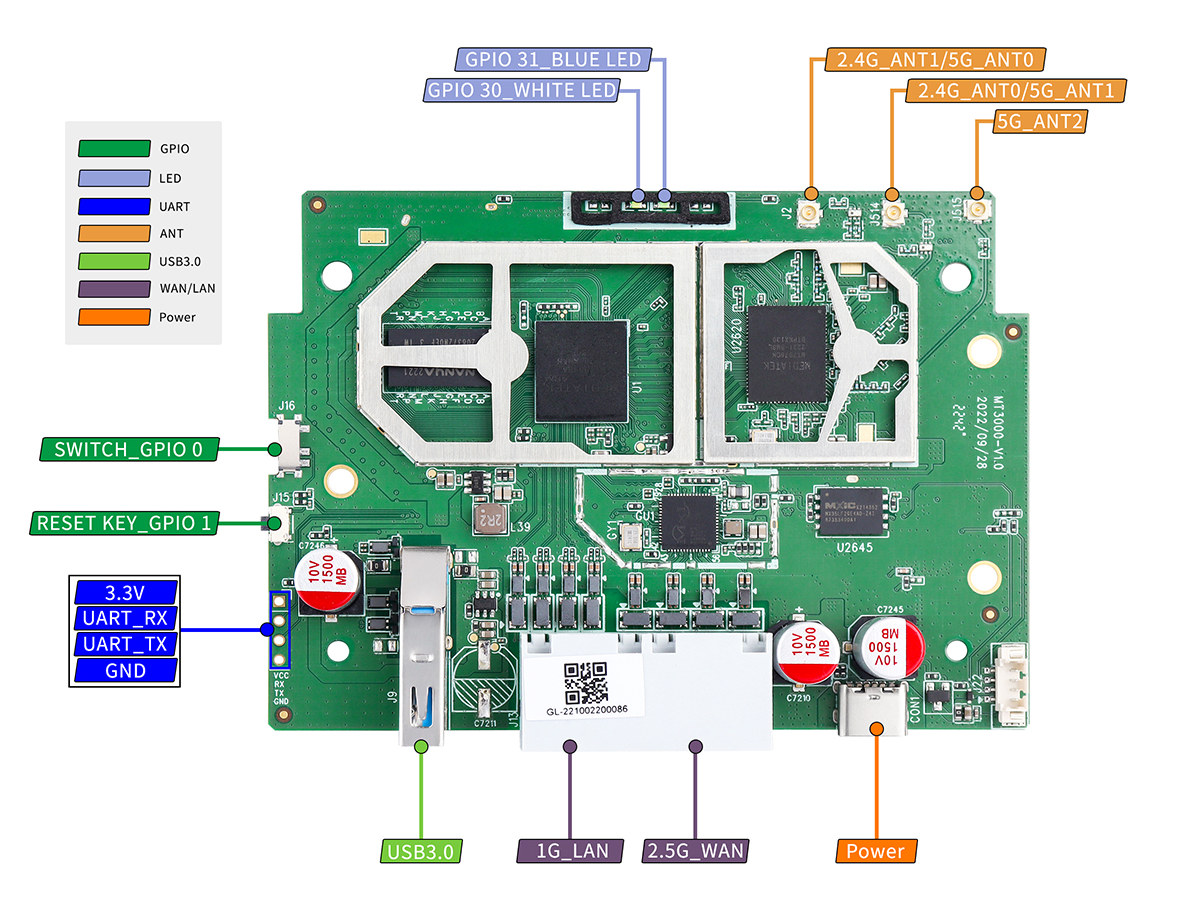
Don’t let the pocket size fool you. These devices pack enterprise-grade networking tech into 3.5-inch shells. At their core sits a Linux-powered System-on-Chip (SoC)—like GL.iNet’s dual-core ARM @ 1.3 GHz—handling firewall duties, traffic routing, and encryption. Entry models use 128MB RAM for basic NAT functions, while flagships boast 512MB DDR4 to manage 60+ devices and WireGuard VPN simultaneously. The real hero? The radio module: dual-band 2.4/5 GHz chips (802.11ac/ax) pushing 15-20 dBm signal strength—matching your smartphone but optimized for stability over raw speed.
Critical Components You Can’t See
- NAT Firewall with SPI: Inspects every data packet entering your network, blocking unauthorized access while allowing legitimate traffic.
- Ceramic Antennas: Embedded in the PCB for omnidirectional coverage (15-20 ft radius), avoiding external protrusions that snag in bags.
- USB-C Power Delivery: Draws 5V/2A from power banks, hotel outlets, or laptops—no bulky adapters needed. Flagship models like Netgear Nighthawk M1 even recharge your phone while routing.
- Flash Memory: Stores firmware and settings (16MB-256MB), enabling features like ad-blocking via DNS sinkholes without slowing traffic.
Connecting to Hotel Ethernet, Wi-Fi, or Cellular in 3 Steps
Forget generic “connect to internet” guides. Here’s exactly how a travel router works with real-world sources:
Plug Into Hotel Ethernet Like a Pro
- Connect the cable from the wall jack to the router’s single RJ-45 port (auto-sensing WAN/LAN).
- Authenticate once: Open 192.168.8.1 on your phone, solve the captive portal, and save credentials.
- Reboot silently: The router now broadcasts your network—no more per-device logins or hidden bandwidth throttling.
Capture Public Wi-Fi Without Captive Portal Hassles
Public hotspots like “Airport_Free_WiFi” often block standard router logins. Your travel router bypasses this by:
– Scanning for SSIDs using 2.4 GHz only (many hotels disable 5 GHz scanning)
– Letting you complete the portal login through the router’s web UI
– Storing session cookies to auto-reconnect for 72 hours
Pro tip: Disable 5 GHz radio during setup if the network doesn’t appear—50% of public Wi-Fi still runs on 2.4 GHz only.
Tether Cellular Without Draining Your Phone
USB tethering beats Wi-Fi hotspots for reliability:
1. Plug your phone into the router’s USB-A port.
2. The router detects RNDIS/ECM interfaces and prioritizes cellular traffic.
3. Enable “bandwidth shaping” to reserve 50% for Zoom calls during remote work.
Flagship models (like GL.iNet Beryl AX) add load-balancing—splitting traffic between your phone and a 5G dongle for 300+ Mbps speeds.
Instant Security Fixes for Public Wi-Fi Threats
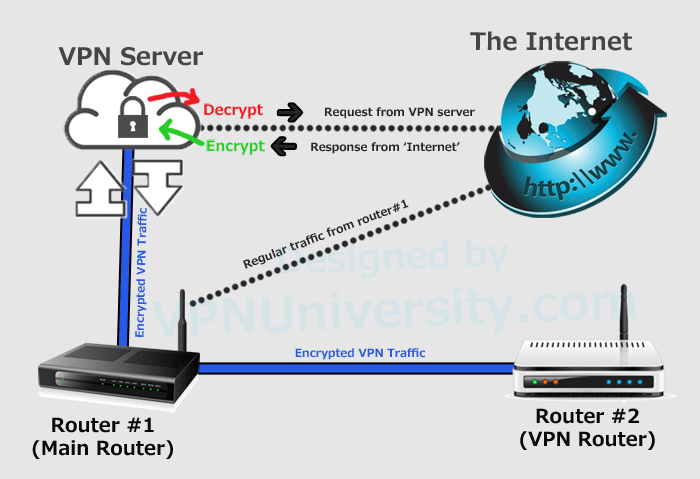
Open networks expose you to snooping, DNS hijacking, and evil-twin attacks. A travel router counters these with built-in shields:
- NAT Firewall: Isolates devices from strangers—your laptop can’t “see” other guests’ phones.
- DNS-over-HTTPS (DoH): Routes queries through Cloudflare or Quad9, blocking malicious sites before they load.
- Policy-Based VPN: Send Netflix traffic through WireGuard (30-300 Mbps speeds) while banking data bypasses the tunnel for speed.
- Auto-Kickoff: Drops idle devices after 10 minutes to prevent session hijacking.
Unlike public networks, your router encrypts all traffic between devices and the internet—even if the original connection was unsecured. No more “HTTPS everywhere” browser extensions needed.
Set Up Your Travel Router in Under 2 Minutes
Initial configuration takes 90 seconds flat:
1. Power on the device (default SSID: “TravelRouter-XXXX”).
2. Connect your phone, then open 192.168.8.1 in any browser.
3. Select upstream source: hotel Ethernet, café Wi-Fi, or phone tether.
4. Set your private SSID, WPA3 password, and admin credentials.
5. Toggle “Auto-Update” for security patches.
Advanced features hide in plain sight: Insert a microSD card for instant file sharing (SMB/FTP server), plug in a USB printer for shared access, or enable Tor mode for anonymous browsing (though this cuts speeds by 50%).
Fix These 4 Common Travel Router Problems Fast
| Symptom | Real Cause | 60-Second Fix |
|---|---|---|
| Hotel Wi-Fi won’t connect | Router scanning 5 GHz only | Force 2.4 GHz scan in radio settings |
| VPN drops on public networks | Port 1194 blocked by captive portal | Switch to TCP 443 in OpenVPN settings |
| Battery dies in 2 hours | 5 GHz radio maxed at 100% power | Lower transmit power to 50% in UI |
| File transfers crawl | USB 2.0 bottleneck (35 MB/s max) | Format drive as exFAT and use FTP instead of SMB |
Firmware updates resolve 80% of glitches—check quarterly via the web UI. If an update fails, all models auto-rollback to the last stable version.
Real-World Speeds: What to Expect From Your Travel Router
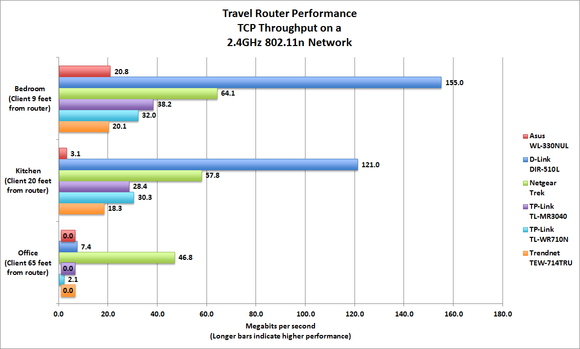
Don’t trust “up to” marketing claims. Real-world performance depends on your model:
- Entry-level ($40 models): 100 Mbps NAT speed (enough for 4K streaming), 10 Mbps OpenVPN, 15 device limit.
- Mid-range ($70 models): 500 Mbps NAT, 150 Mbps WireGuard, 40 devices. Disable 5 GHz to stretch battery life to 12 hours.
- Flagships ($90+): 900 Mbps NAT, 300 Mbps WireGuard, 60+ devices. Use Wi-Fi 6 to slash interference in crowded hostels.
Pro tip: In RV parks or hostels, set transmit power to 75%—it extends battery life by 30% with zero range loss in single-room setups.
Picking Your First Travel Router: Budget vs. Flagship
| Use Case | Best Value Pick | Why It Wins |
|---|---|---|
| Basic hotel fixes | TP-Link TL-WR902AC ($40) | Dual-band Wi-Fi, USB-powered, 15-device limit |
| Digital nomad work | GL.iNet GL-MT3000 ($70) | OpenWrt firmware, Gigabit port, 40-device capacity |
| 5G hotspot + battery | Netgear Nighthawk M1 ($250) | Built-in 4G LTE, 5040 mAh battery, 900 Mbps NAT |
Avoid “file hub” hybrids if you need VPN—dedicated travel routers like GL.iNet models prioritize security over media sharing. All run the same core trick: grab any internet source, wrap it in encryption, and rebroadcast as your private network.
Key Takeaway: How does a travel router work? It transforms unstable connections into secure, private networks by acting as your single point of contact with the internet—handling logins, encryption, and failover automatically. Whether you’re paying $40 or $250, you’re buying peace of mind: no more per-device fees, no exposed traffic, and seamless connectivity from Bali hostels to transatlantic flights. For immediate security, always enable WPA3 and DNS-over-HTTPS. Next, explore setting up a WireGuard tunnel to your home server for true enterprise-grade privacy on the road. Your devices deserve a network you control—not one controlled by hotels, airports, or strangers.